
Export Pipeline
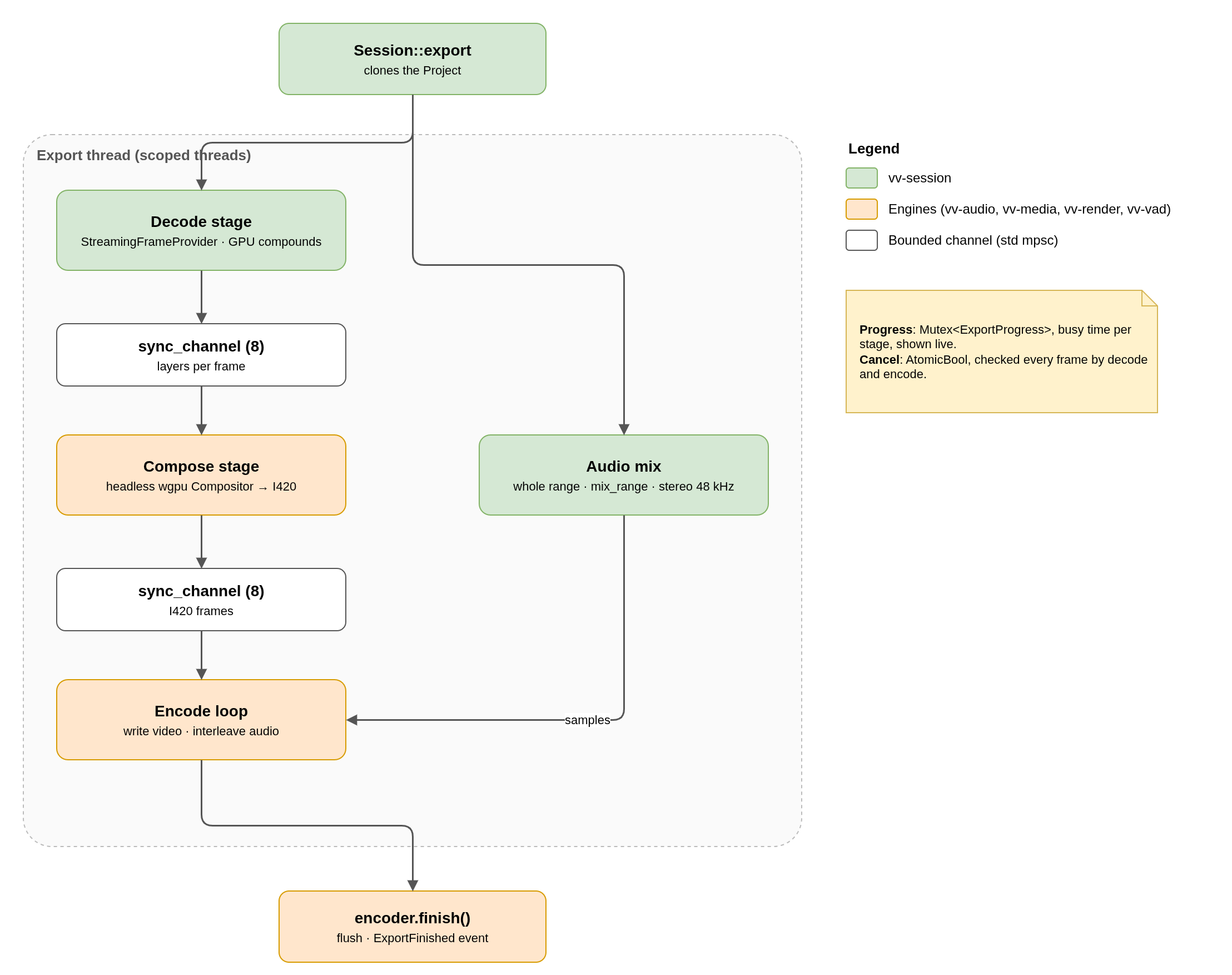
export_timeline renders a frame range to a file with the same layers and the same audio mix as the preview. Session::export runs it on a dedicated thread over a clone of the project, so editing continues during the export.
Stages
| Stage | Work |
|---|---|
| Decode (scoped thread) | For each frame: active video clips, both sides of crossings, track_layers_at through GpuCompounds and StreamingFrameProvider. Hardware decoders are tried in the order listed in the settings; an empty list means CPU decoding. |
| Compose (scoped thread) | Headless wgpu Compositor, render_layers_i420 at the output size. |
| Encode (export thread) | Writes each video frame, then the audio up to the end of that frame. |
| Audio mix (scoped thread) | The whole range mixed at once with mix_range, stereo 48 kHz. It first collects which file windows the mix needs, then decodes only those. |
The stages are linked by bounded sync_channels of 8 frames, so decode runs ahead of compose, and compose ahead of encode, without unbounded memory.
Settings
| Setting | Detail |
|---|---|
| Video encoder | x264, NVENC, VideoToolbox or Vulkan. ExportSettings::preferred picks NVENC when it really opens. |
| Audio encoder | AAC, or FDK AAC when available. Audio is left out when no audio track has clips. |
| Scale | 100 / 75 / 50 / 25 % of the timeline resolution, rounded to even dimensions for 4:2:0. |
Progress and cancellation
ExportProgress(behind aMutex) holds current frame, total, elapsed time, busy time and fps per stage, the decode paths actually used, the GPU adapter and the encoder. Busy time excludes waits on other stages, so the slowest stage shows the bottleneck.- Cancel is an
AtomicBoolchecked every frame by the decode and encode loops. Errors and cancellation also mark the progress as done; the host getsSessionEvent::ExportFinishedfromtick(). render_frame_rgbareuses the decode and compose path for a single frame (the MCPrender_frametool).
No comments to display
No comments to display