
Timeline UI
timeline_ui.rs (~6.7k lines, the largest module) is the multi-track timeline widget. It is drawn with egui's painter and hand-written hit-testing rather than nested widgets: for a dense grid of rectangles that is far cheaper.
Contract with the app
show_timeline is called once per frame from the bottom panel. It receives the project and the history mutably, plus read-only display data, and returns what the app must handle itself.
| Input | Purpose |
|---|---|
Project, History | Edits are applied through History::do_command, never by writing to the project directly. |
TimelineState | Selection, playhead, zoom, scroll, current gesture, clipboard, export in/out. The only state the widget mutates freely. |
| Buffered / proxy ranges | Drawn as strips under the ruler, to show what is ready to play. |
| Waveform cache | Peaks loaded once from the on-disk cache, drawn on audio clips. |
| Output | Handled by the app |
|---|---|
| Media drop (drag, frame, target) | Inserts media from the pool or viewer at that position. |
| Compound to enter | Pushes the current timeline onto timeline_stack; a breadcrumb leads back. |
Request flags on TimelineState | Speed, silence and paste-attributes dialogs; reveal in media pool. |
From pointer to command
At most one Gesture runs at a time. During a drag only the preview moves; the project changes once, on release, through a PendingAction.
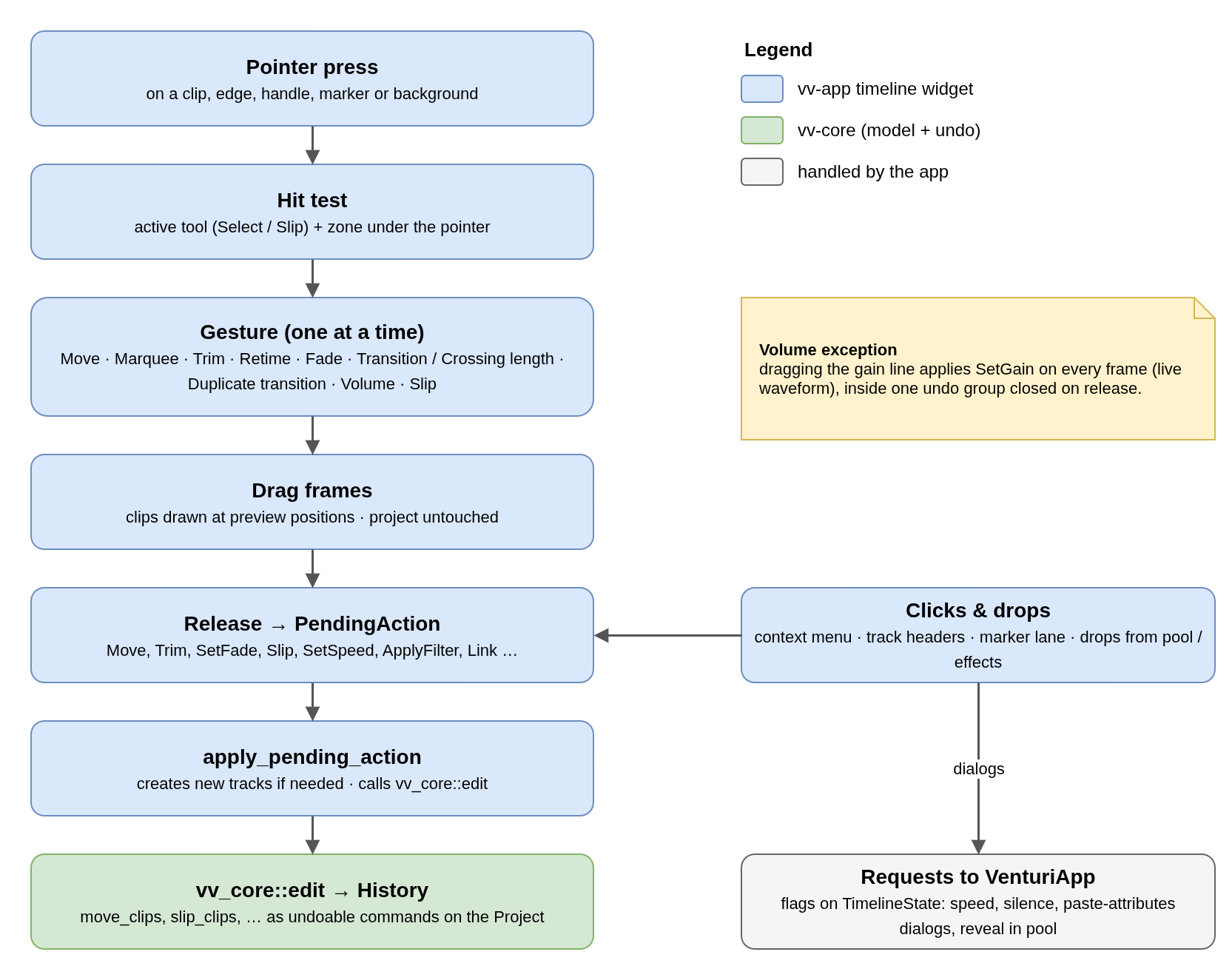
Deferring the edit to a single PendingAction keeps one code path for drags, context-menu entries and drops, and means a cancelled or no-op drag never touches the history.
Gestures
| Gesture | Started by |
|---|---|
| Move | Dragging a clip body (Alt duplicates). Can create new tracks. |
| Marquee | Dragging from the background: rubber-band selection. |
| Trim | Dragging a clip edge; lengthening overwrites what is underneath. |
| Retime | Dragging the right edge with the retime bar shown (Ctrl+R): changes speed. |
| Fade | Dragging a fade handle at the top corner. |
| Transition / crossing length | Dragging the end of a transition marker. |
| Duplicate transition | Alt+drag on a transition body. |
| Volume | Dragging the gain line of an audio clip. |
| Slip | Any clip drag with the Slip tool: moves the media under a fixed clip. |
Layout
- Ruler: time ticks plus a marker lane (
timeline_markers.rs: point and range markers, notes). - Two panes: video tracks above, audio tracks below, separated by a draggable divider. Each pane scrolls on its own; video tracks rest against the divider, as in other NLEs.
- Track headers: lock, enable, mute/solo/arm buttons and add/remove track, all emitted as
PendingActions. - Navigation: Alt+wheel zooms time, Ctrl+wheel scrolls horizontally, Shift+wheel changes track height; touchpad swipes keep kinetic momentum.
Selection rules
- Click, Ctrl+click and Shift+click work as in a file manager. A selection is always extended to the clip's linked group, so audio and video move together.
- A selected gap or transition replaces the clip selection: a gap is closed by ripple delete, a transition opens its own properties panel.
- When "selection follows playhead" is on, moving the playhead selects the video clip under it.
Related modules
| Module | Role |
|---|---|
timeline_markers.rs | Marker lane: draw, drag, note editor |
speed_dialog.rs | Clip speed dialog and the Ctrl+R retime handles |
silence_dialog.rs | Silence removal dialog and the red preview of the cuts |
paste_attributes.rs | Paste attributes (Alt+V) from the clipboard to the selection |
voiceover.rs | Records the microphone onto armed tracks while playing at 1x |
slip_viewer.rs | Split viewer during a slip: first and last frame of the clip |
No comments to display
No comments to display