
GPU Compositor
vv_render::Compositor turns the stack of layers active at one timeline frame into a single RGBA texture on the GPU (wgpu). The same code serves the viewer, the export, compound clips and the Color window; only the clear color and what happens to the result differ.
Compositing one frame
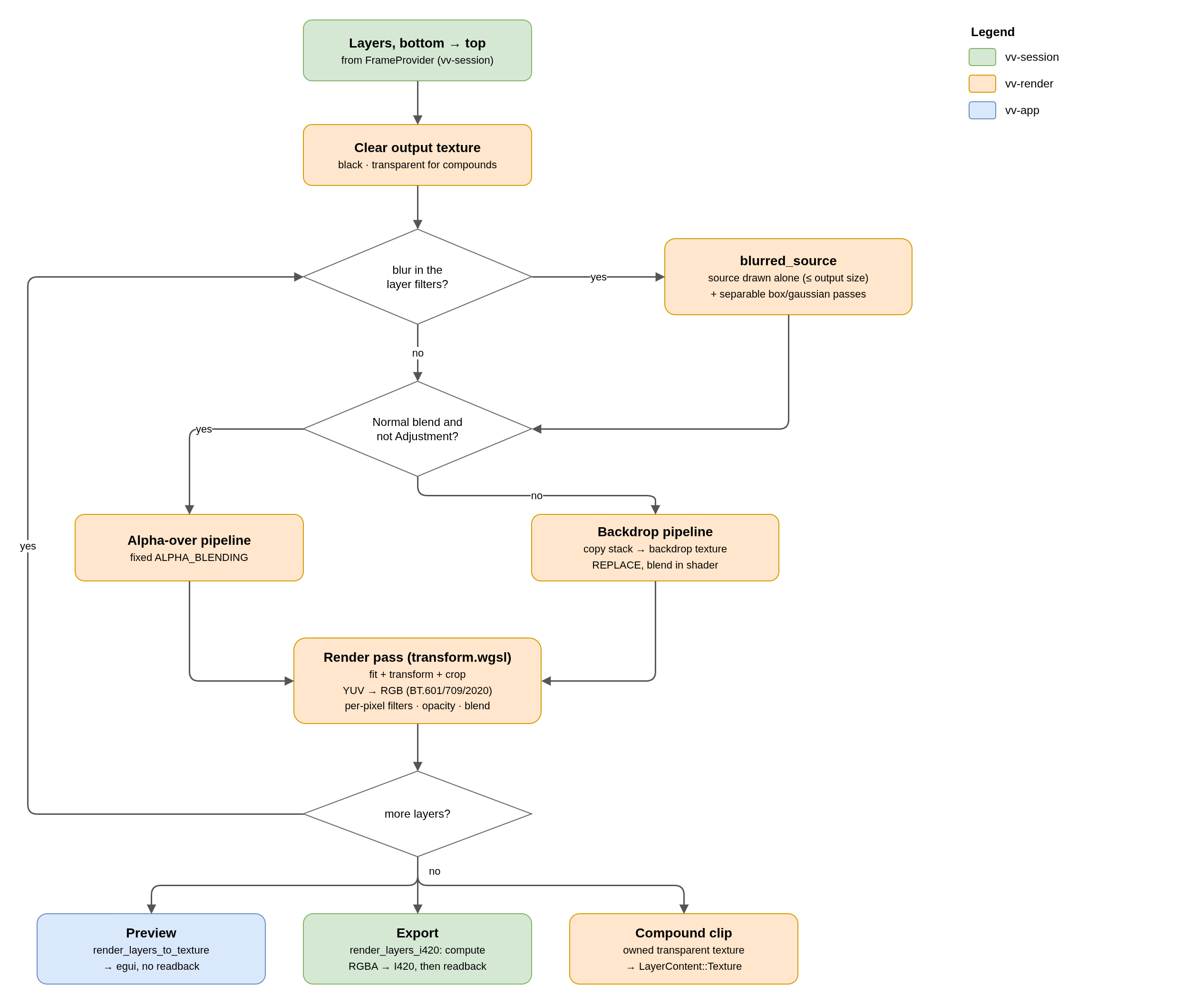
Layer contents
| LayerContent | Source of the pixels |
|---|---|
| Video | Decoded Y/U/V planes (+ optional alpha) uploaded as R8/RG8 textures; YUV → RGB in the shader |
| Texture | An already composed texture: the nested timeline of a compound clip, never read back to the CPU |
| Solid | Color from the uniform, treated as a source as large as the timeline |
| Text | Coverage masks from text.rs, one pass per mask (see Text Rendering) |
| Adjustment | A copy of the stack below, redrawn with the layer's transform and filters; it replaces the stack and mixes with it by opacity |
Transform semantics
- The source is first fitted into the output keeping its aspect ratio: bars (letterbox / pillarbox) instead of stretching. Bars have alpha 0, so the layer below shows through.
- Position and anchor are in timeline pixels; crop and crop softness in media pixels at native resolution, so a proxy crops exactly like the original. The model's Y axis points up, as in an NLE.
- Zoom (per axis) and rotation act around the anchor; flip mirrors; crop softness feathers the edge through alpha.
Filters and blending
| Feature | Implementation |
|---|---|
| Per-pixel filters (Color correction, Exposure) | Inside the transform shader, up to 8 per layer, in the user's order. The color correction reads its own uniform (binding 8, see Color Correction & Scopes). |
| Box / Gaussian blur | Separate passes on an intermediate texture (they need neighbours); keyframable radius and direction; taps capped at 96 per side |
| Opacity | Uniform multiplier on the layer alpha (clip fades) |
| Blend modes | Normal uses fixed alpha blending; the other 14 (Add, Multiply, Screen, Overlay…) read a copy of the stack as backdrop and blend in the shader |
Work format and precision
Layers are composed into work textures whose format follows the project's ProcessingPrecision, so a chain of passes (blurs, adjustment clips, blend modes) does not round to 8 bits at every step.
| Precision | Work format |
|---|---|
| High (default) | Rgba16Float, if the adapter can render, blend and filter it; otherwise falls back to 8 bits |
| Standard | Rgba8Unorm: half the memory and bandwidth |
What leaves the compositor as 8 bits is resolved once, with spatial triangular dither (dither.wgsl, a pcg2d hash: the same frame always gives the same bytes). Values already on an 8-bit step are left alone, so flat colors and black bars stay clean. In Standard precision the work texture already is the output and the resolve pass is skipped. set_precision rebuilds the pipelines for the new format; textures already handed out keep theirs.
Rec.709 luma and Cb/Cr live in color.wgsl, prepended to the transform, scopes and I420 shaders; vv_core::luma and cb_cr are their CPU mirrors.
Outputs
| Method | Used by |
|---|---|
render_layers_to_texture | Viewer: resolved to Rgba8Unorm, stays on the GPU, registered in egui. Composes at the decoded frame's resolution widened to the timeline aspect (fit_output_size), so the content is never upscaled. |
render_layers_i420 | Export: timeline resolution; a compute shader reads the work texture and converts to BT.709 limited I420, dithering once in YUV and halving the readback. |
render_layers_to_owned_texture_transparent | Compound clips and the Color window's scopes: transparent clear, left in the work format; the texture returns to a pool when the holder drops it. |
Plane, output and work textures are pooled by size and format (up to 32 each): allocating them every frame cost more than the drawing. With no layers the result is just the clear color (a black frame).
No comments to display
No comments to display