
Panels & Dialogs
The window is built from egui docked panels plus floating windows. Each panel's visibility and size live in Settings::panels, so the layout survives restarts.
Window layout
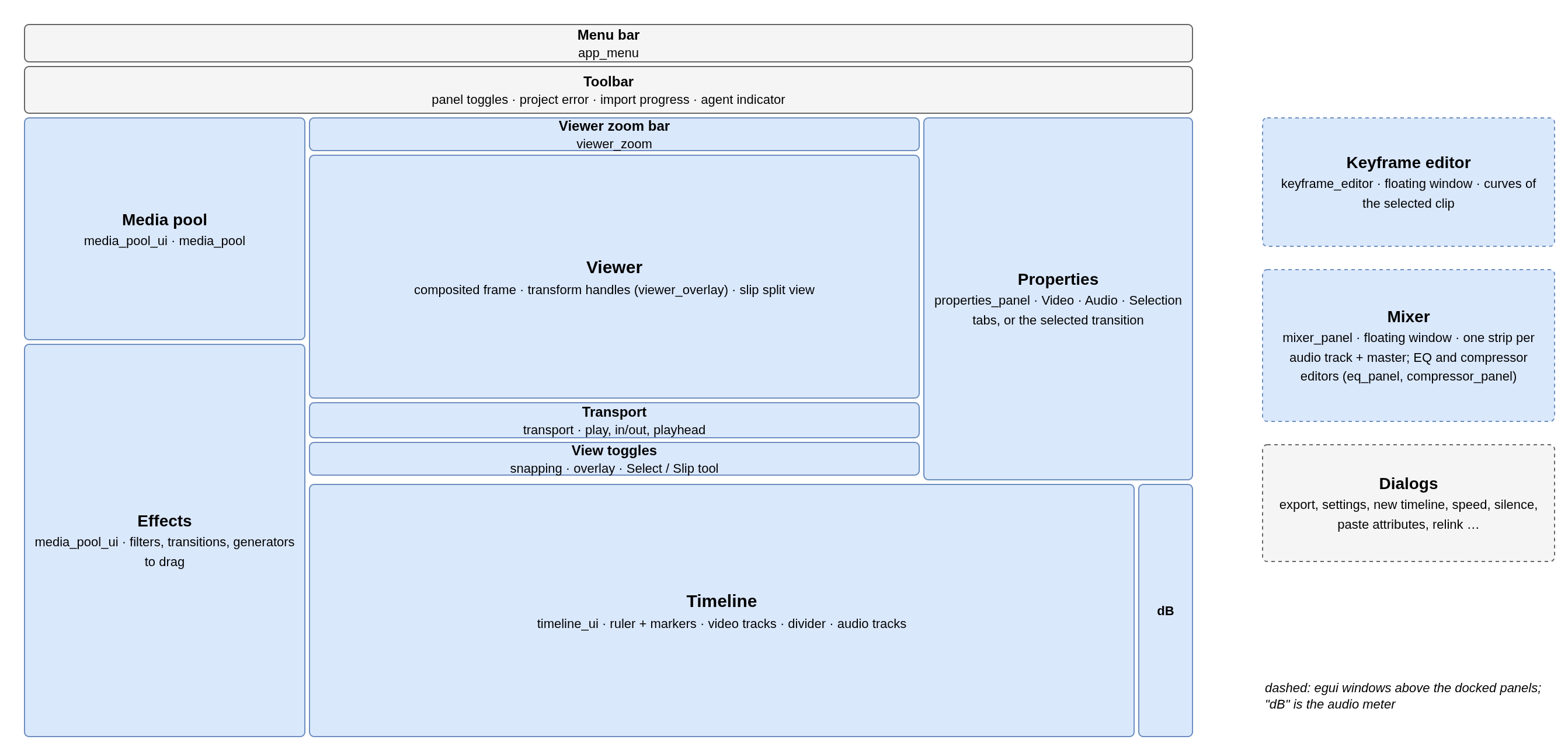
egui allocates panels in the order they are added. The left column comes first and takes the full height; the timeline then takes the bottom of what is left; the properties panel sits on the right above it; the viewer column gets the centre.
How panels edit the project
Panels never write to the project. Each one returns a list of commands, and the app applies them in one place:
- The panel reads the project and the selection, draws its controls and returns
Vec<BoxedCommand>. apply_effect_changeswraps several commands in oneCompositeCommand(multi-selection edits undo together).- While the pointer is down, or a preview dropdown is open, commands join one undo group, closed on release.
The properties panel and keyframe editor target the selected clips: the first one supplies the displayed values, changes go to all of them. Values are read at the playhead mapped into each clip's source frame, because keyframes live in source frames.
Panels
| Panel | Module · contents |
|---|---|
| Media pool | media_pool_ui, media_pool · folders, thumbnails, offline state; selection logic is a pure function, testable without egui |
| Effects | media_pool_ui · generators, filters and transitions to drag onto the timeline |
| Properties | properties_panel · Video, Audio, Selection tabs with keyframe toggles, title editor; a selected transition replaces the tabs. The color correction section is grade_panel, shared with the Color window |
| Color window | color_window · two GPU scopes of the selected clip, measured by itself, above its color correction (see Color Correction & Scopes) |
| Keyframe editor | keyframe_editor · one row per animated parameter, curve of the chosen row; painter-drawn like the timeline |
| Mixer | mixer_panel · one strip per audio track plus master, meters, effect chain |
| EQ / compressor | eq_panel, compressor_panel · response curve over the live spectrum, draggable bands; presets saved to settings at once |
| Audio meter | main.rs · narrow band right of the timeline, peak with decay |
Dialogs
A dialog is an Option<…Dialog> field on VenturiApp: Some while open, drawn every frame, set back to None on close. Widgets that cannot open one themselves (the timeline) raise a request flag the app reads in the same frame.
| Dialog | Module |
|---|---|
| Export settings | export_dialog |
| Settings | settings_dialog |
| Project settings (processing precision) | app_menu |
| New timeline | new_timeline_dialog |
| Clip speed | speed_dialog |
| Remove silences | silence_dialog |
| Paste attributes | paste_attributes |
| Forced relink | forced_relink_dialog |
| Progress, warnings, unsaved changes, OTIO merge | project_io, main.rs |
File pickers run on a separate thread (pending_dialog): on the GNOME/Wayland event-loop thread a blocking picker would mark the app as unresponsive.
Background workers owned by the UI
| Worker | Job |
|---|---|
ProxyWorker | All-intra proxies, one at a time, on its own thread so playback decoding is not slowed; paused during export |
WaveformWorker | Waveform peaks for audio streams, one at a time |
ThumbnailWorker | Media-pool thumbnails; opening and seeking a file costs too much on the UI thread |
All three are created on the first import, skip what the on-disk cache already has, and are polled once per frame.
No comments to display
No comments to display