
Keyframes & Transforms
Every animatable parameter is a Keyframed<T>: a sorted Vec<(FrameIdx, T, Interpolation)> plus a default used when there are no keyframes. Values are evaluated at render time and never baked into cached frames.
Evaluation
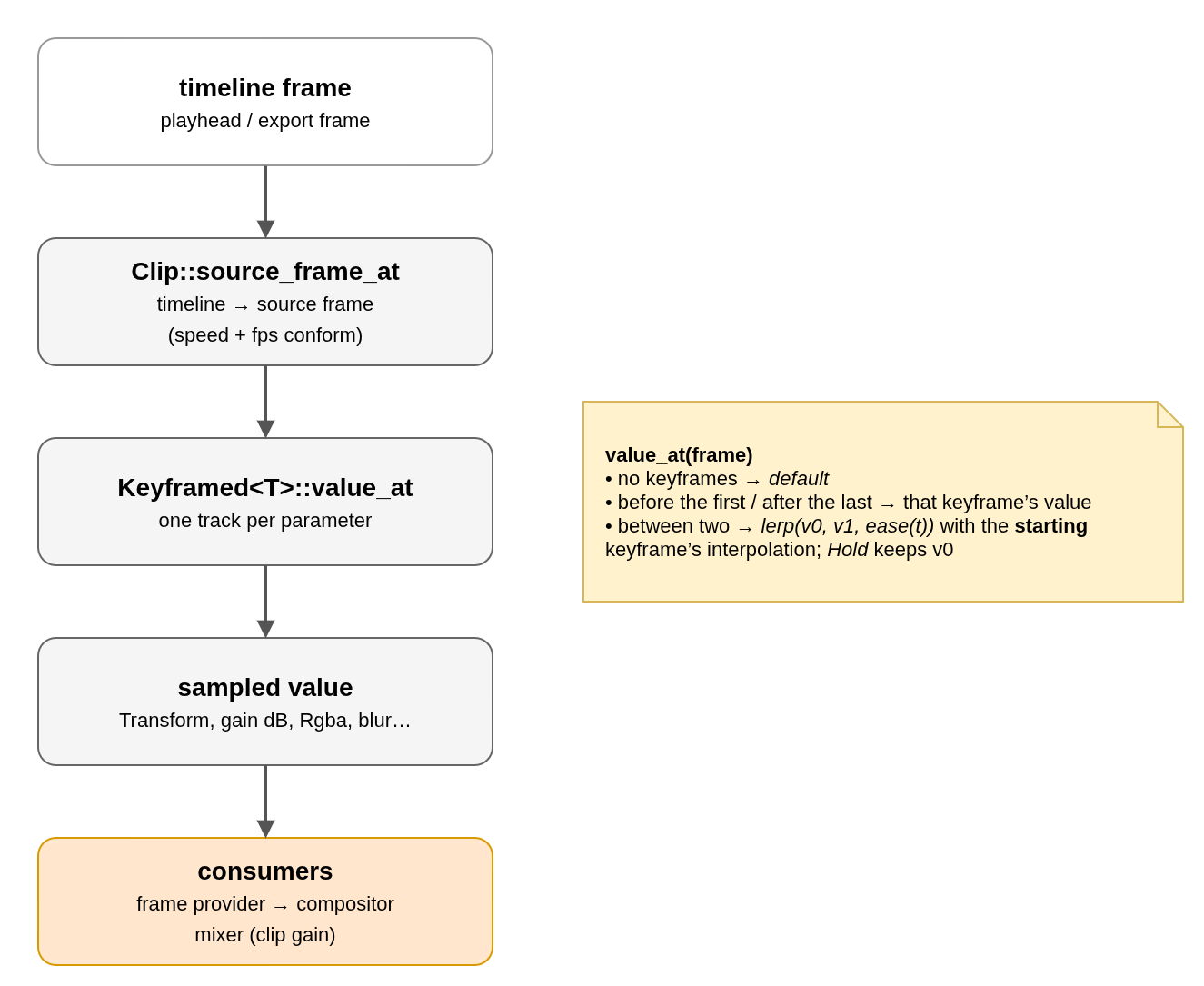
Keyframes live on source frames: the renderer and the mixer sample at clip.source_frame_at(frame). Trimming or moving a clip therefore never shifts its animation relative to the picture. A split gives each half only the keyframes on its side of the cut, adding a joining keyframe where needed so the value at the cut is unchanged (drop_before / drop_from).
Interpolation
| Variant | Curve |
|---|---|
Hold | Step: keeps the value until the next keyframe. |
Linear | Straight line. |
EaseInOut, EaseIn, EaseOut | Smoothstep, quadratic in, quadratic out. |
Bezier { c1, c2 } | Free cubic, normalised like CSS cubic-bezier; x is inverted by bisection. |
The interpolation stored on a keyframe drives the segment that starts there.
What is animatable
| EffectStack field | Tracks |
|---|---|
transform | 13 independent Keyframed<f32>: zoom X/Y, position X/Y, rotation, anchor X/Y, crop left/top/right/bottom, crop softness, opacity. flip is not animatable. |
gain_db | Keyframed<f32>, clip volume. |
color | Keyframed<Rgba>, solid colour clips. |
filters[i] | Blur radius and direction, exposure amount, and the 18 color correction params (GradeTracks, see Color Correction & Scopes). |
Not keyframed: title parameters, blend mode, transitions, and fades (fade_in/fade_out are linear ramps in frames).
Transform units
| Parameter | Unit |
|---|---|
| crop, crop softness | Media pixels at native resolution (not the proxy's). |
| position, anchor | Timeline pixels, Y up; anchor relative to the clip centre. |
| zoom | Factor per axis around the anchor. |
| rotation / opacity | Degrees clockwise / percent 0–100. |
Projects saved before a parameter existed have fewer transform tracks; the missing ones load with their default value.
No comments to display
No comments to display