
OTIO Import/Export
Timelines travel to and from other NLEs as OpenTimelineIO JSON (vv_core::otio), tested against DaVinci Resolve. The code writes and reads the JSON directly with serde_json; there is no OTIO library dependency.
Mapping
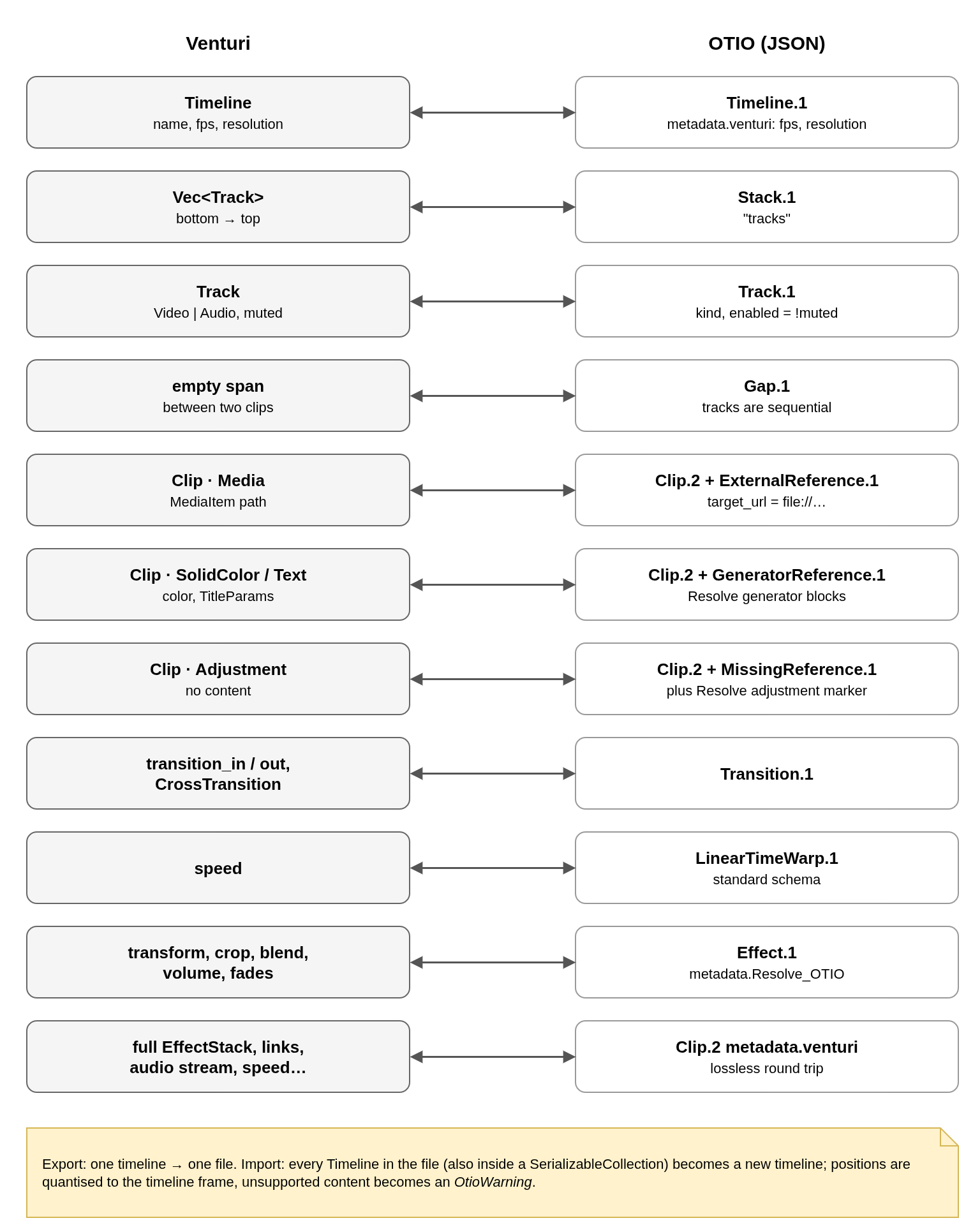
Three layers of data
| Where | For whom |
|---|---|
| Standard schema | Any OTIO reader: tracks, clips, gaps, transitions, media references, speed. |
metadata.Resolve_OTIO | Resolve, which only reads its own namespace: transform, crop, composite mode, volume and fades as Effect.1 blocks; solid colours and titles as Resolve generators. |
metadata.venturi | Venturi itself: the full EffectStack, link groups, audio stream, fades, colour, speed. A file exported by Venturi comes back identical. |
Modules
| File | Role |
|---|---|
export.rs | One timeline → one file. Holes become Gaps; source_range is expressed at the timeline fps, exact even for conformed clips. |
import.rs | File → a new Project plus OtioWarnings. Positions are quantised to the timeline frame by accumulating seconds, so no drift builds up along a track. |
resolve.rs | Resolve effect parameters: ids, units, normalisation to the fitted frame. |
generator.rs | Resolve solid colour and text generators. |
Import into an open project
The import runs as a vv-session job: the file is parsed and its media probed in the background (project_from_otio, with a probe callback), then pool::absorb merges the imported project into the open one inside a single AddEntities command — one undo step. New media go into a folder named after the file; media already in the pool can be reused instead of duplicated. Unsupported content (unknown effects, Fusion titles, odd references) is reported as warnings, and unreadable media are imported offline for relinking.
Title export needs the text block size, which only text shaping knows: callers pass a MeasureTitle function.
No comments to display
No comments to display