
Viewer, Transport & Playback
Playback is split across threads so the UI never waits on a decoder: video is decoded ahead by RenderAhead, audio is decoded by the mix_buffers workers and played by the mixer, and the UI thread only composes what is already in memory.
Pipeline
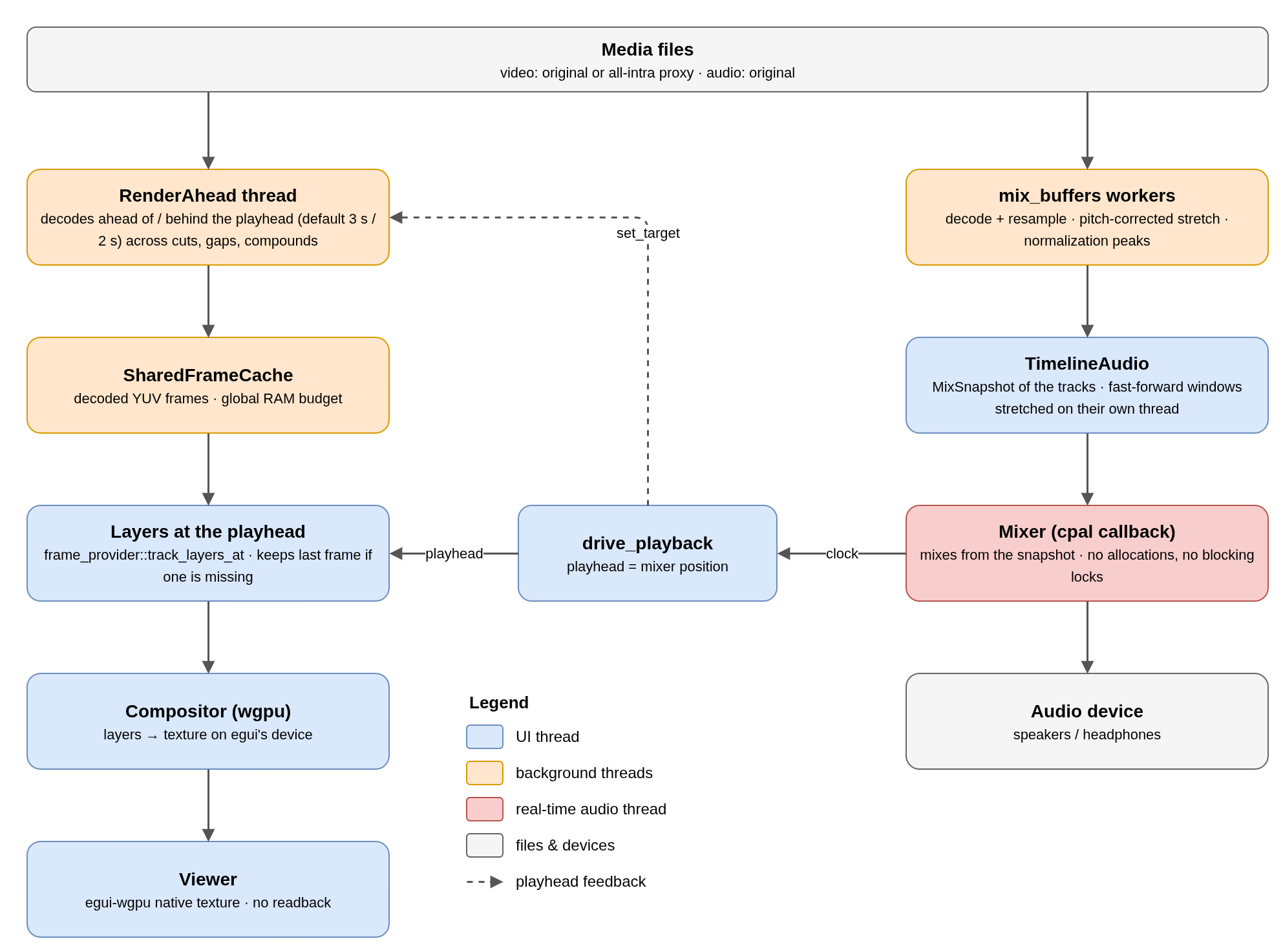
The audio clock drives the playhead
While playing, drive_playback sets the playhead to the mixer's position every frame. Video follows audio, not the other way round, so A/V sync holds even when a frame is late: the viewer keeps the last composed frame instead of stalling the sound. Without an audio device the clock falls back to wall time and nothing is played.
| Speed | How it plays |
|---|---|
| 1x | The mixer mixes the tracks straight from the current MixSnapshot. |
| 2x / 4x / 8x (key "a") | 8-second windows of the mix are time-stretched on a separate thread, one request in flight. The new speed applies only when its first window is ready. |
| Scrub | An 80 ms audio snippet plays at each user move of the playhead (toggle in the Timeline menu). |
RenderAhead: the video buffer
- Each buffer has one thread that walks forward from the playhead (default 3 s) and a little behind (2 s), crossing cuts, gaps and tracks without special cases.
- Decoded frames go into the buffer's
SharedFrameCacheunder the configured RAM budget. At speeds above 1x the window grows, then shrinks back if the media playing together would not fit the budget: over-asking would leave holes, i.e. black flashes. - Compound clips are not decoded: their nested timelines are walked only to keep the real media warm; they are composed on the GPU when the outer frame is drawn.
- The app runs separate buffers for the timeline, the media-pool preview and, during a slip, one for each end of the clip.
- The playhead target is updated every frame; the project copy inside the buffer is refreshed only when
History::generation()changes.
Composing the viewer frame
timeline_video_layersasksvv_session::frame_providerfor the layers of every active video clip at the playhead, bottom to top.- If a frame is still being decoded the call returns
Noneand the previous image stays on screen, instead of flashing black where the clip should be. Once the buffer reports it is caught up, a frame that never arrives is dropped so the preview cannot freeze. show_compositedrenders the layers with theCompositorinto a wgpu texture and updates the egui texture in place. If layers and output size match the last frame, nothing is re-uploaded.- The frame is composed at the decoded resolution, widened to the timeline's aspect ratio, so letterbox bars appear without upscaling.
Viewer modes
| Mode | Shows |
|---|---|
| Timeline | Composited frame at the playhead, with transform handles (viewer_overlay.rs). |
| Media-pool preview | One media as it is, with its own in/out; dragging the image puts that range on the timeline. Any timeline interaction returns to timeline mode. |
| Slip | First and last frame of the slipped clip side by side (slip_viewer.rs). |
| Offline / empty | A message instead of an image. |
Zoom and pan (viewer_zoom.rs) only change how the texture is drawn, never what is composed. The transport bar (transport.rs) serves both the preview (in/out = range to drop on the timeline) and the timeline (in/out = range to export).
No comments to display
No comments to display