
Voiceover Recording
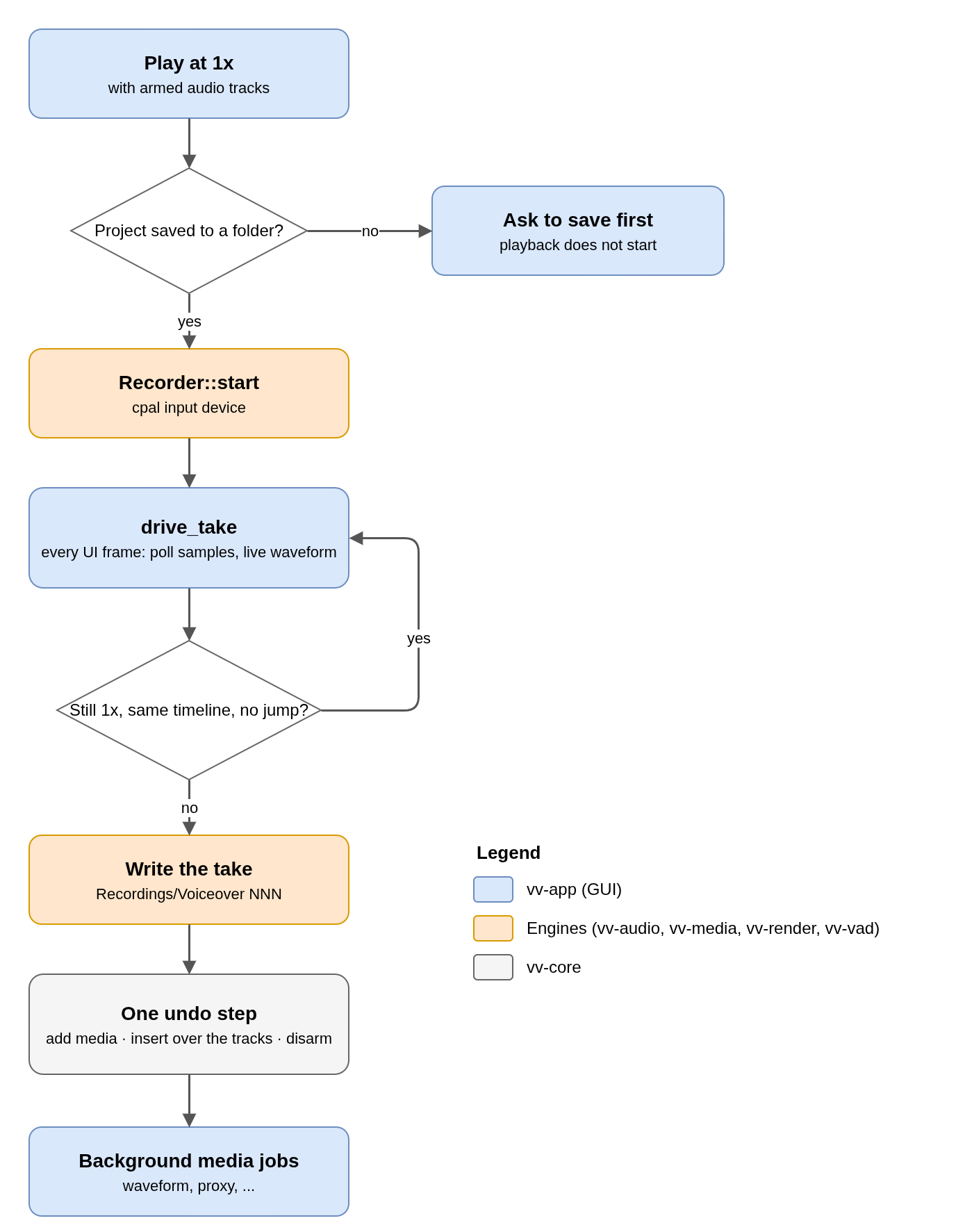
Voiceover records the microphone onto the armed audio tracks while the timeline plays at 1x, over whatever is already there. The recorder lives in vv_audio::recorder; the take logic is in vv-app/src/voiceover.rs.
| Step | Detail |
|---|---|
| Input | Recorder::start opens a cpal input stream on the device chosen in Settings, or the default one. Samples stay at the device's rate and channel count. |
| Live view | drive_take runs every UI frame. It collects samples (the device does not wait) and extends the peaks of the live waveform on the timeline. |
| End of take | The take ends when playback stops, leaves 1x, switches timeline, or the playhead jumps more than 0.5 s from the recorded time (a seek or scrub). |
| File | Written in the Recordings folder next to the project file as Voiceover NNN, in the format chosen in Settings, then probed like any import. This is why the project must be saved first. |
| Timeline | One undo step: add the media, insert one clip per armed track (overwriting what it covers), disarm the tracks so the next playback does not record over the take. |
No comments to display
No comments to display